Bali Fuel Watch brings maps community fuel reports, station status, and supply forecasts across Bali to help drivers choose where to check next for drivers, residents, visitors, delivery riders, and people coordinating journeys around Bali. This guided workflow view explains the role of Bali Fuel Watch, the first useful step, and the decision points that matter in a real session. That keeps Bali Fuel Watch tied to an actual need. Readers can try the workflow on a small example, see whether its core action fits their need, and then decide whether it belongs in a larger routine. The product is most useful when people judge it against a clear task rather than an assumption that one site should replace every other option.
Bali Fuel Watch is easiest to evaluate when the feature is connected to a practical outcome. From a guided workflow perspective, a visitor should understand how the workflow moves from an input to a result that can be inspected. A helpful guide connects discovery, the main action, and a final quality check in a short sequence. For this product, that means noticing the main action, confirming the expected output, and identifying where a person still needs to make a judgement. A short trial answers more than a broad feature list: it shows whether the workflow fits the task, which settings influence the result, and what should be reviewed before use.
Community reporting works best when a visitor shares a fresh observation from the correct location. A current report that fuel is available may help another driver avoid a wasted stop; an empty report can help people reconsider a long queue. Contributions should describe the relevant product and status without sharing personal information about other drivers. The map becomes more valuable when people treat reports as shared local context and update them when conditions change. A first visit to Bali Fuel Watch can stay narrow: use one representative input, make one decision, and compare the result with the original. This makes it easier to learn where the workflow helps and which details still need human review.
People who live in Bali may return to the map during periods of changing supply, while visitors can use it to orient themselves in an unfamiliar area. The interface gathers several imperfect signals in one place. The careful approach is to use the map as a starting point, confirm critical details locally, and help keep reports current. This supports better planning while preserving a realistic view of uncertainty. A first visit to Bali Fuel Watch can stay narrow: use one representative input, make one decision, and compare the result with the original. This makes it easier to learn where the workflow helps and which details still need human review.
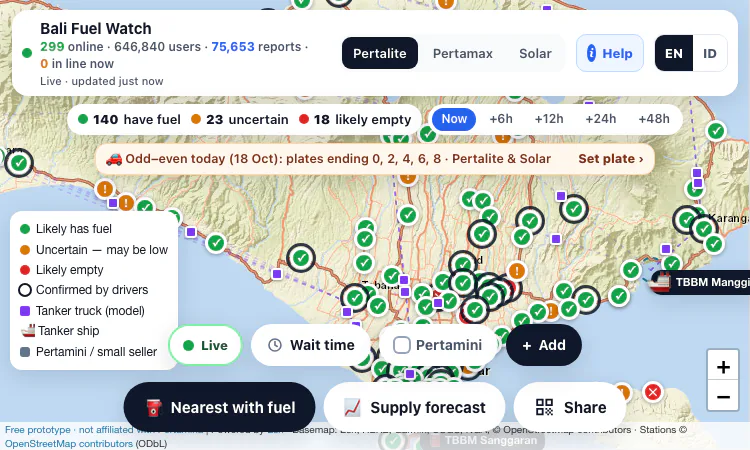
This community-oriented map helps people check reported fuel availability at stations in Bali. It places station markers over a live map and uses a legend for likely fuel, uncertain reports, likely empty stations, and driver-confirmed information. A driver can scan the local picture before choosing a route. Conditions can change between a report and arrival, so the display is a planning signal and not a guarantee that a pump will have stock. A first visit to Bali Fuel Watch can stay narrow: use one representative input, make one decision, and compare the result with the original. This makes it easier to learn where the workflow helps and which details still need human review.
The controls include Pertalite, Pertamax, and Solar so a visitor can focus on the fuel type they need. Marker colors and shapes distinguish station reports from supply context, including tanker or truck symbols. Reading the legend first helps avoid confusing an estimated delivery with a confirmed stock report. The category control is useful when a map contains many markers and the traveler needs to narrow the view to one product. A first visit to Bali Fuel Watch can stay narrow: use one representative input, make one decision, and compare the result with the original. This makes it easier to learn where the workflow helps and which details still need human review.
Drivers can report that a station has fuel or appears empty, and those observations are displayed for other map visitors. Fresh local reports can help another person choose where to check next. Recency and confidence matter: stock can change after a report, and one observation may not describe every fuel type or queue. Users should check the update time and contribute a correction when their own visit provides a useful new observation. A first visit to Bali Fuel Watch can stay narrow: use one representative input, make one decision, and compare the result with the original. This makes it easier to learn where the workflow helps and which details still need human review.
Timeline controls include Now and future views such as six, twelve, twenty-four, and forty-eight hours, alongside a supply forecast. These options help a user compare how conditions may shift; they do not promise an exact delivery or restock time. For a longer trip, the forecast can be one planning signal among several. Drivers should check current local information again before setting out, especially when the route depends on a single station. A first visit to Bali Fuel Watch can stay narrow: use one representative input, make one decision, and compare the result with the original. This makes it easier to learn where the workflow helps and which details still need human review.
A nearest-with-fuel action and a wait-time view help turn a broad map scan into a more practical choice. A driver can look for a station near the current area and consider whether a queue changes the decision. The map does not replace navigation or confirm that a station is open. It puts reports and planning controls together, which can reduce aimless detours when fuel availability is uncertain. A first visit to Bali Fuel Watch can stay narrow: use one representative input, make one decision, and compare the result with the original. This makes it easier to learn where the workflow helps and which details still need human review.
The map also identifies Pertamini or small sellers and includes an add control, while tankers and trucks appear as separate symbols. That adds supply context beyond the status of a single large station. A marker should still be interpreted through its legend and checked against local signs before purchase. The mix of locations and supply indicators becomes more useful when the user knows which points are community reports and which are modeled. A first visit to Bali Fuel Watch can stay narrow: use one representative input, make one decision, and compare the result with the original. This makes it easier to learn where the workflow helps and which details still need human review.
Start with one small example that represents the real need, then review the output, settings, and current terms. Following the steps in order keeps a first visit manageable and makes the next decision easier. That keeps the first decision manageable and makes the strengths of this product easier to see. It may fit when the main workflow is already close to the work a person needs to finish. Before depending on it, community updates and forecasts may be stale or wrong; confirm locally and do not treat the prototype as an official feed. A careful first session creates a useful basis for deciding whether to return for a larger task.

Flying Roadster AI Video Generator takes a car photo on a cinematic journey, with optional portrait, vertical or widescreen framing, and downloadable results.

Project Moon Life is a free browser journey through a changing City, where each randomized life follows a different route shaped by your choices.
Flower Wand Garden is a free, browser-based interactive camera experience that turns your fingertip into a virtual magic wand.
Seven free football mini-games in one browser hub — career sims, legend guessing, squad building, and a daily challenge that is identical for everyone.

Get an instant, fully in-browser PSL rating from one photo — nothing uploads anywhere, and you receive a score, tier, breakdown, and share-ready card.
Recreate the hidden band of a world flag with HSB sliders while the preview updates live — five rounds a game, scored by perceptual color distance.