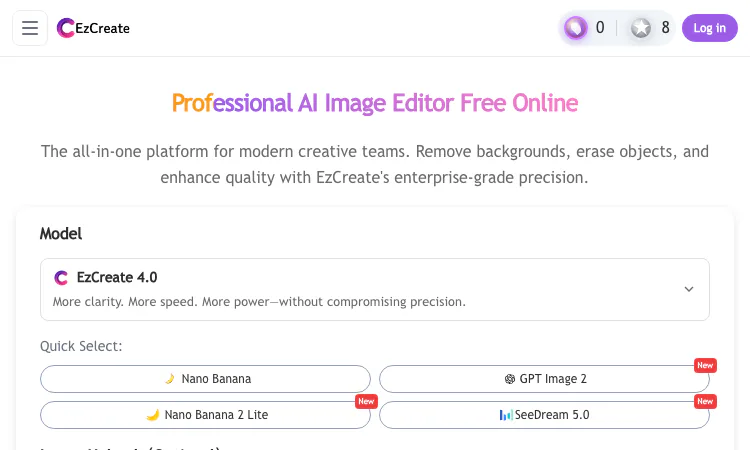
EzCreate helps designers, online sellers, social creators, and people improving personal photos a cleaner image or a new visual variation without a desktop editing setup. This guided workflow view explains the role of EzCreate, the first useful step, and the decision points that matter in a real session. Readers can try EzCreate on a small example, see whether its core action fits their need, and then decide whether it belongs in a larger workflow. The product is most useful when EzCreate is judged against a clear task rather than an assumption that one tool should replace every other option.
EzCreate is easiest to evaluate when the feature is connected to a practical outcome. From a guided workflow perspective, a visitor should understand how EzCreate moves from an input to a result that can be inspected. A helpful guide connects discovery, the main action, and a final quality check in a short sequence. For EzCreate, this means noticing the main action, confirming the expected output, and identifying where a person still needs to make a judgement. A short trial with EzCreate answers more than a broad feature list: it shows whether the workflow fits the task, which settings influence the result, and what should be reviewed before use.
The captured page showed eight guest credits and a two-credit cost on the image-generation action. The site also describes daily free credits, no watermarks, and automatic deletion of uploads after 24 hours. These details can change, so users should check the live account controls, pricing, and privacy policy before relying on them. Anyone working with sensitive images should decide whether the current retention terms fit the job before uploading. For EzCreate, the practical benefit is easier to judge when the input and intended result are specific. A person using EzCreate can make one change, review the outcome, and decide what still needs attention. The EzCreate workflow becomes clearer after a small first attempt, and EzCreate is simpler to compare when the original example remains available.
The workflow is a fit for people who want to explain an image edit in ordinary language and see a result quickly. A shop owner can clean a product background, a creator can extend a crop, and an individual can try restoring an old photo. It is not a replacement for every precise layer-based design task. Its strength is a focused edit or generation that the user can inspect, revise, and export from a browser. For EzCreate, the practical benefit is easier to judge when the input and intended result are specific. A person using EzCreate can make one change, review the outcome, and decide what still needs attention. The EzCreate workflow becomes clearer after a small first attempt, and EzCreate is simpler to compare when the original example remains available.
The page combines a model selector, optional image upload, prompt box, aspect-ratio controls, resolution settings, and a generation button. EzCreate 4.0 appears as the default model in the captured interface, while quick options include Nano Banana, GPT Image 2, Nano Banana 2 Lite, and SeedDream 5.0. Model availability changes, so the live picker is the best source for current choices. Editing and generation are presented in one browser-based workspace. For EzCreate, the practical benefit is easier to judge when the input and intended result are specific. A person using EzCreate can make one change, review the outcome, and decide what still needs attention. The EzCreate workflow becomes clearer after a small first attempt, and EzCreate is simpler to compare when the original example remains available.
JPG, PNG, and WebP uploads are supported up to 24 MB. A source photo might be a product shot, portrait, social image, scanned picture, or another visual that needs cleanup. Uploading is optional for image creation, but an existing image gives an edit a concrete visual reference. The prompt sits beside the image controls, so the user can describe the change without moving to a separate application or setting up a complex project first. For EzCreate, the practical benefit is easier to judge when the input and intended result are specific. A person using EzCreate can make one change, review the outcome, and decide what still needs attention. The EzCreate workflow becomes clearer after a small first attempt, and EzCreate is simpler to compare when the original example remains available.
Object removal is intended for photobombers, marks, and details that distract from the main subject. The editor analyzes surrounding texture and lighting and reconstructs the selected area for review. A plain wall is generally easier to rebuild than intricate lettering, repeated patterns, or hair. Users can compare the result with the source and revise if an artifact remains. That makes the feature suitable for routine cleanup, with a quality check still part of the process. For EzCreate, the practical benefit is easier to judge when the input and intended result are specific. A person using EzCreate can make one change, review the outcome, and decide what still needs attention. The EzCreate workflow becomes clearer after a small first attempt, and EzCreate is simpler to compare when the original example remains available.
Background isolation can prepare a subject for a catalog, presentation, or a new layout. Fine hair and transparent glass are challenging edges, so checking a cutout on both light and dark surfaces can expose halos or missing pixels. Once removed, the original background can be replaced or the transparent subject can move to another design workflow. Keeping the steps together in a browser can be useful for a creator who only needs a few clean assets. For EzCreate, the practical benefit is easier to judge when the input and intended result are specific. A person using EzCreate can make one change, review the outcome, and decide what still needs attention. The EzCreate workflow becomes clearer after a small first attempt, and EzCreate is simpler to compare when the original example remains available.
Generative fill can extend a portrait into a wider banner, recover context around a cropped subject, or continue a visual style into a new area. A prompt describes how the added section should match the original perspective. When there is no source photo, the same workspace can create a new image from text. This combination supports both corrective editing and early creative exploration, with room to adjust the prompt after reviewing an initial result. For EzCreate, the practical benefit is easier to judge when the input and intended result are specific. A person using EzCreate can make one change, review the outcome, and decide what still needs attention. The EzCreate workflow becomes clearer after a small first attempt, and EzCreate is simpler to compare when the original example remains available.
The tool presents restoration and upscaling for old, compressed, or low-resolution images, including output choices up to 4K. Sharpening can make a picture more useful on a larger screen, but it cannot guarantee recovery of details absent from the source. People should inspect faces, text, and textures at normal viewing size before treating an enhanced file as final. That is especially important for archival photos and product visuals where invented details would be misleading. For EzCreate, the practical benefit is easier to judge when the input and intended result are specific. A person using EzCreate can make one change, review the outcome, and decide what still needs attention. The EzCreate workflow becomes clearer after a small first attempt, and EzCreate is simpler to compare when the original example remains available.
Start with one small example that represents the real need, then review the output, settings, and current terms. Following the steps in order keeps a first visit manageable and makes the next decision easier. That keeps the first decision manageable and makes the strengths of EzCreate easier to see. The product may fit when its main workflow is already close to the work a person needs to finish. Before depending on EzCreate, check model availability, credit cost, privacy terms, and fine-detail quality for the current task. A careful first session with EzCreate creates a useful basis for deciding whether to return for a larger task.

Flying Roadster AI Video Generator takes a car photo on a cinematic journey, with optional portrait, vertical or widescreen framing, and downloadable results.

Project Moon Life is a free browser journey through a changing City, where each randomized life follows a different route shaped by your choices.
Flower Wand Garden is a free, browser-based interactive camera experience that turns your fingertip into a virtual magic wand.
Seven free football mini-games in one browser hub — career sims, legend guessing, squad building, and a daily challenge that is identical for everyone.

Get an instant, fully in-browser PSL rating from one photo — nothing uploads anywhere, and you receive a score, tier, breakdown, and share-ready card.
Recreate the hidden band of a world flag with HSB sliders while the preview updates live — five rounds a game, scored by perceptual color distance.